Klaaryo updates
August 2026 · Aug 28, 2026
🌟 Klaaryo Product Updates – August 2026

🌟 August News: visibility, transparency, and new tools for a smoother recruiting process
August was a month of targeted refinements: we worked to make information more visible and accessible, improve template management, and bring new analytics and transparency tools to the platform. In addition to the new features, we optimized several existing behaviors to make them more precise and intuitive. Here are all the updates already available on the platform.
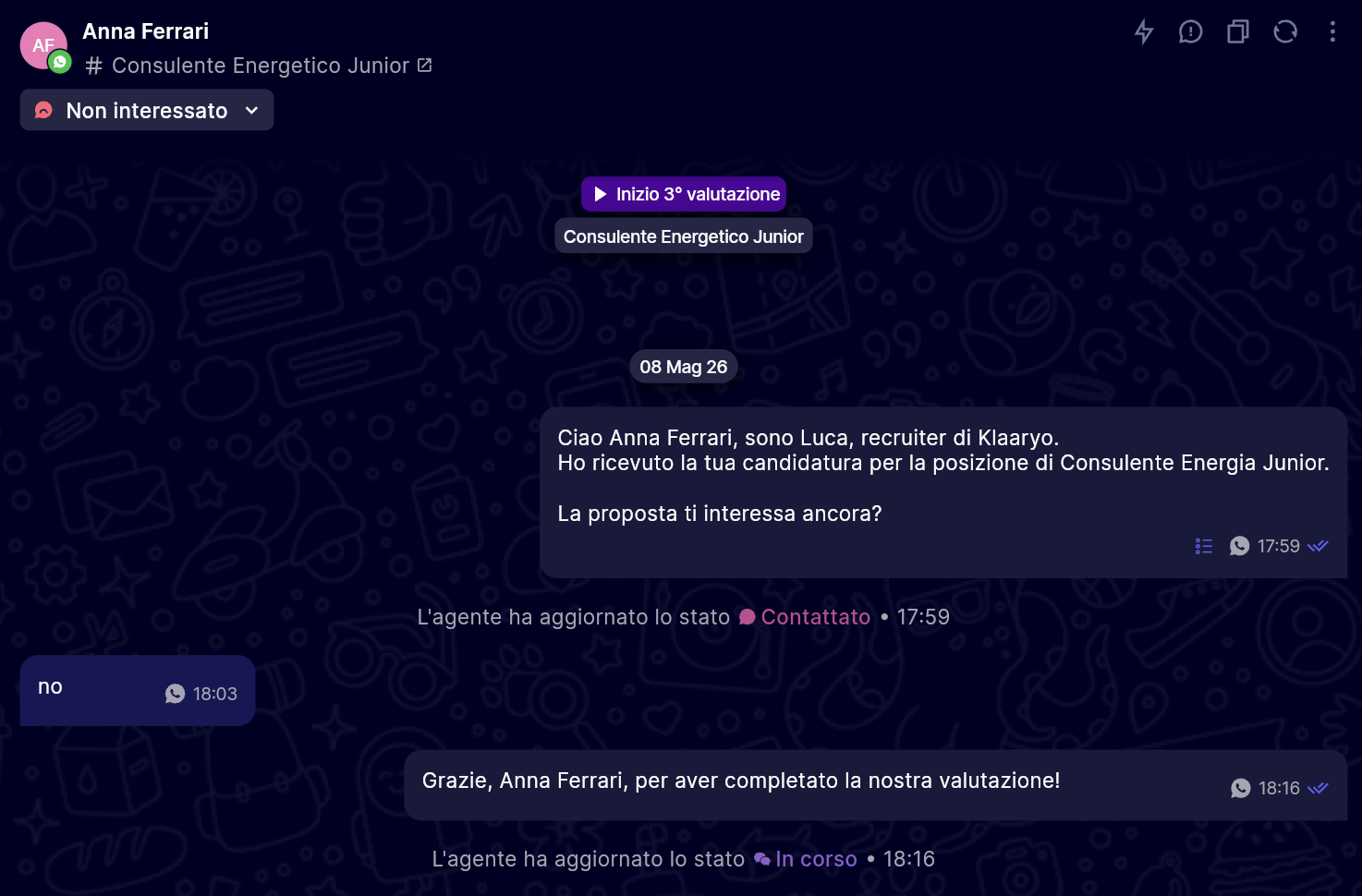
1) Pipeline status changes visible in chat 💬
Previously, to understand when and by whom a candidate's status had been updated, you had to exit the chat and consult other sections. Now pipeline status changes are displayed directly in the chat, with the date, time, and author of the change, so you have all the context in one place without having to switch screens.
2) Segmented access by tab - multi-tenant 🗂️
If you manage multiple Klaaryo accounts, you can now open them simultaneously on different tabs of the same browser without having to log out and log in every time. Each tab maintains its own session independently, making work across multiple spaces much faster and more efficient.
3) Improved message templates ✉️
Template management is now more flexible and new supported templates have been introduced. Among the new features: follow-up, next intro, and other formats that allow for further customization of communications with candidates during the different stages of the selection process.
4) Internal analytics snapshot 📊
We have introduced a new module that collects and updates key data from your recruiting process (talent pool, AI conversations, calendar, and time-to-hire), making it available in a structured way to power the platform's statistics. Conversations with Hiring Managers are excluded from this calculation.
5) Interactive actions in Inbox 👁️
When the assistant sends a WhatsApp message with interactive elements (quick replies, buttons with links, option lists, or WhatsApp Flow modules), a small indicator now appears next to the message in the Inbox. Hovering over it opens a read-only summary showing: the type of interaction sent, the text of the opening button for lists and Flows, the title of each individual option, and the link associated with a button, with a shortcut to copy it. The feature is available in chats with both candidates and store managers.
6) Filter for Hiring Manager groups 🔍
Interview data can now be filtered by hiring manager groups, making session management simpler and more immediate when working with teams structured across multiple levels or geographic areas.
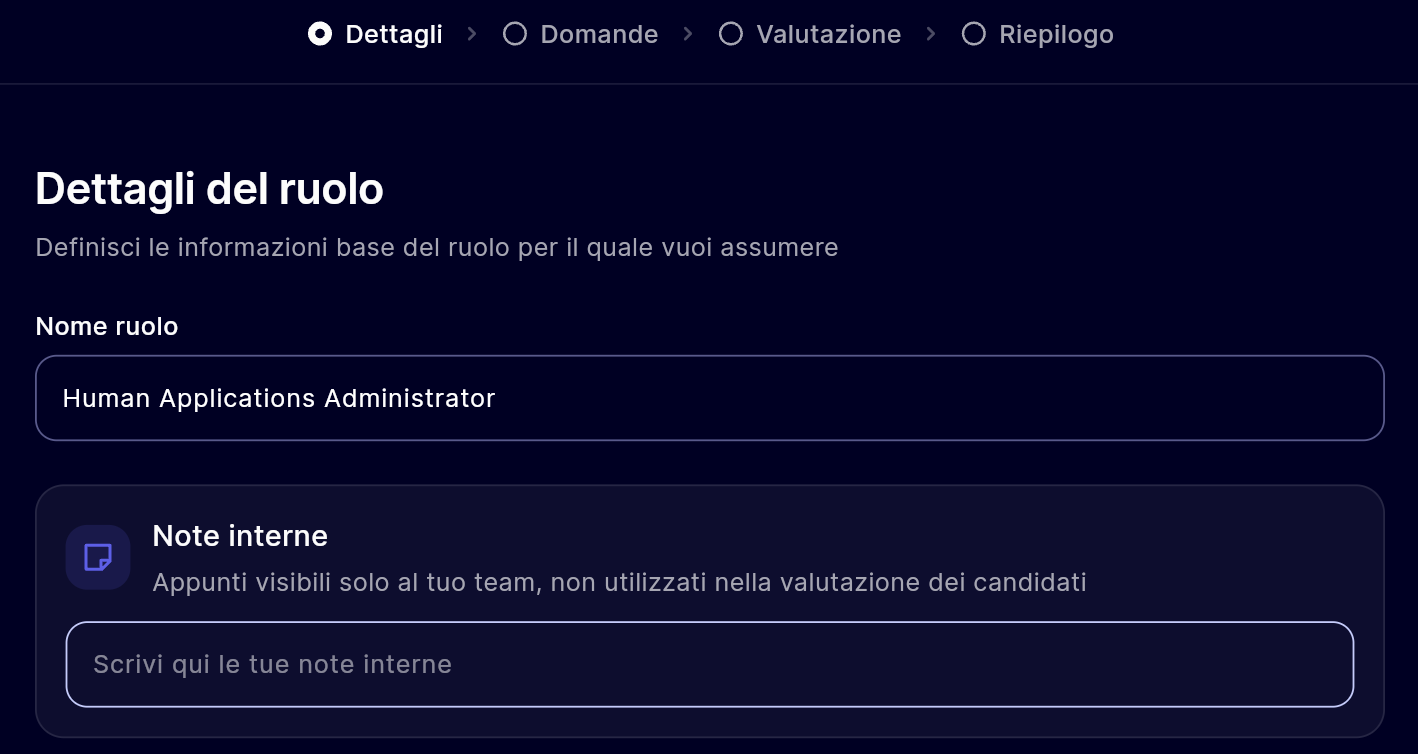
7) Internal notes on job role 📝
It is now possible to add internal notes directly on job roles to keep track of relevant information (configuration instructions, specific position context, updates) without having to resort to external tools.
Thank you for continuing to build this journey with us,
The Klaaryo team 👋🏼July 2026 · Aug 3, 2026
🌟 Klaaryo Product Updates – July 2026
🌟 What's new in July: hierarchy, control, and data quality for even more structured recruiting
July has been a month full of updates: we worked to give you more control over your organization's structure, improve data quality, and make the job lifecycle more flexible. In addition to the new features, we refined several existing behaviors to make them more robust and predictable. Here are all the updates already available on the platform.
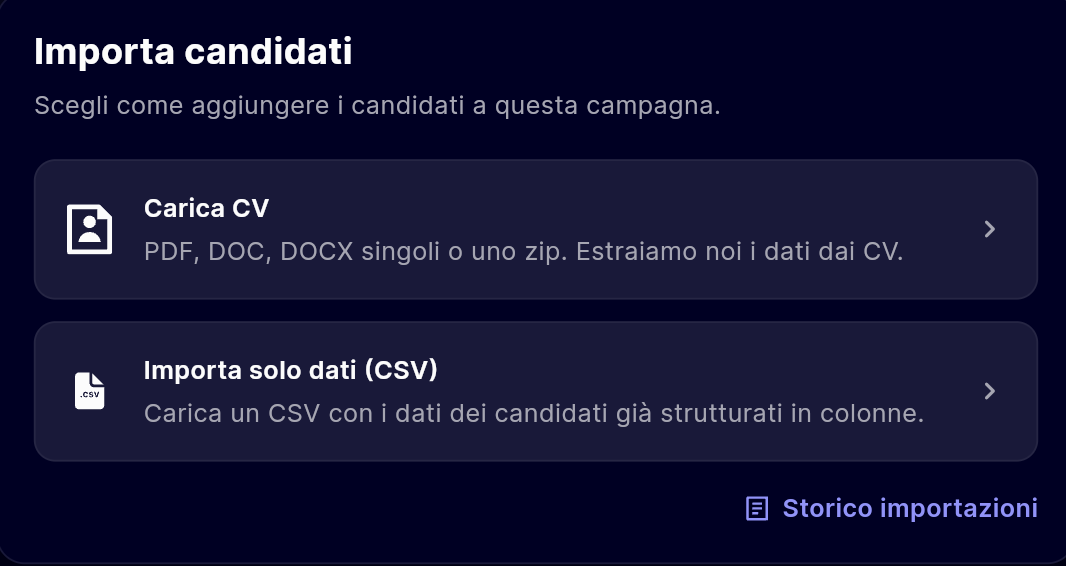
1) Uploading CVs directly from app.klaaryo.com 🎥
New candidate import channel via direct CV upload from app.klaaryo.com. Users can drag&drop a single CV (PDF/DOC/DOCX) or a batch zip file (up to 75 MB, 200 CVs); files are uploaded and then an asynchronous job extracts personal data and creates candidates using existing CV channel rules.
2) Resend interview link + calendar view 📅
Previously, once the interview link was shared with the candidate, it was not easy to resend it if needed. Now you can resend the link at any time if the candidate has lost it or needs a new communication. Additionally, the interview link is now viewable directly on your calendar, keeping everything organized and easily accessible from a single view.
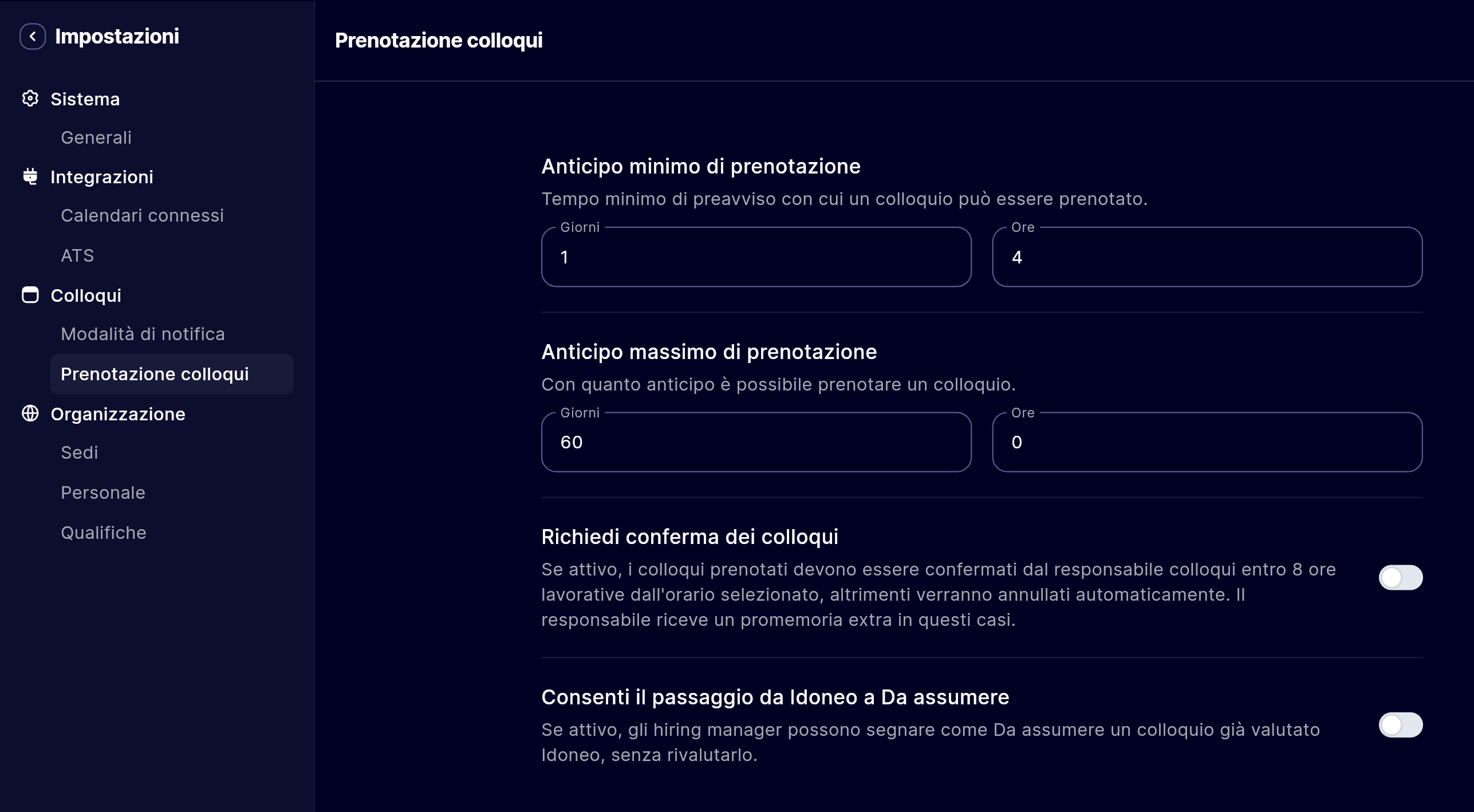
3) Minimum/maximum slot offset from Settings ⏳
Until now, constraints on slot availability were fixed for everyone. With this update, you can configure the minimum and maximum time shift for slot booking directly from settings, customizing booking times based on your organization's needs.
4) Reason for non-bookable slot 👁️
When a candidate finds no available slots, the reason is often unknown. Now the recruiter can see exactly why a slot is not bookable (minimum offset not reached, interviewer's calendar full, calendar event), making the process more transparent for both the team and the candidates.
5) Move/add a candidate between campaigns 📊
Sometimes a candidate might be of interest for multiple campaigns simultaneously. Now you can easily add a candidate from one campaign to another without needing to re-import them, maintaining full history and reusing already collected data (candidate import in collections).
6) Closing campaigns with grace period ⏱️
Previously, when the ATS communicated that a campaign had been closed, the position was immediately archived in Klaaryo. Now campaigns close after a configurable grace period, allowing you to continue collecting and managing applications for a few extra days before definitive archiving. This feature can be activated upon request.
7) Interviewer analytics + Time-to-Hire 📈
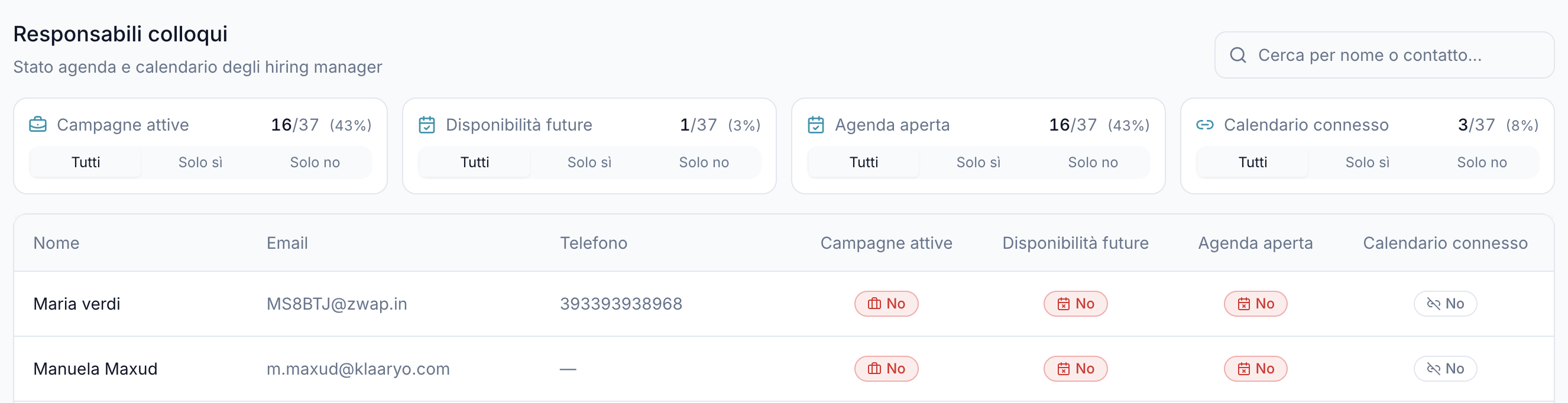
Now you can monitor the status of interviewers with new specific analytics views (connected calendar, open agenda, availability) and track the time-to-hire metric, allowing you to identify bottlenecks in the recruiting process and optimize hiring times.
Thank you for continuing to build this journey with us,
The Klaaryo team 👋🏼May 2026 · Jun 5, 2026
🌟 Klaaryo Product Updates – May 2026
🌟 May news: hierarchy, control, and data quality for an even more structured recruiting process
We have introduced the concept of Qualifications to map roles and hierarchy within your organization, improved contact data management, and added new tools to control the life cycle of job positions. In addition to the new features, we have refined several existing behaviors to make them more robust and predictable. Here are all the updates already available on the platform.
1) Know (and manage) your company hierarchy 🏢
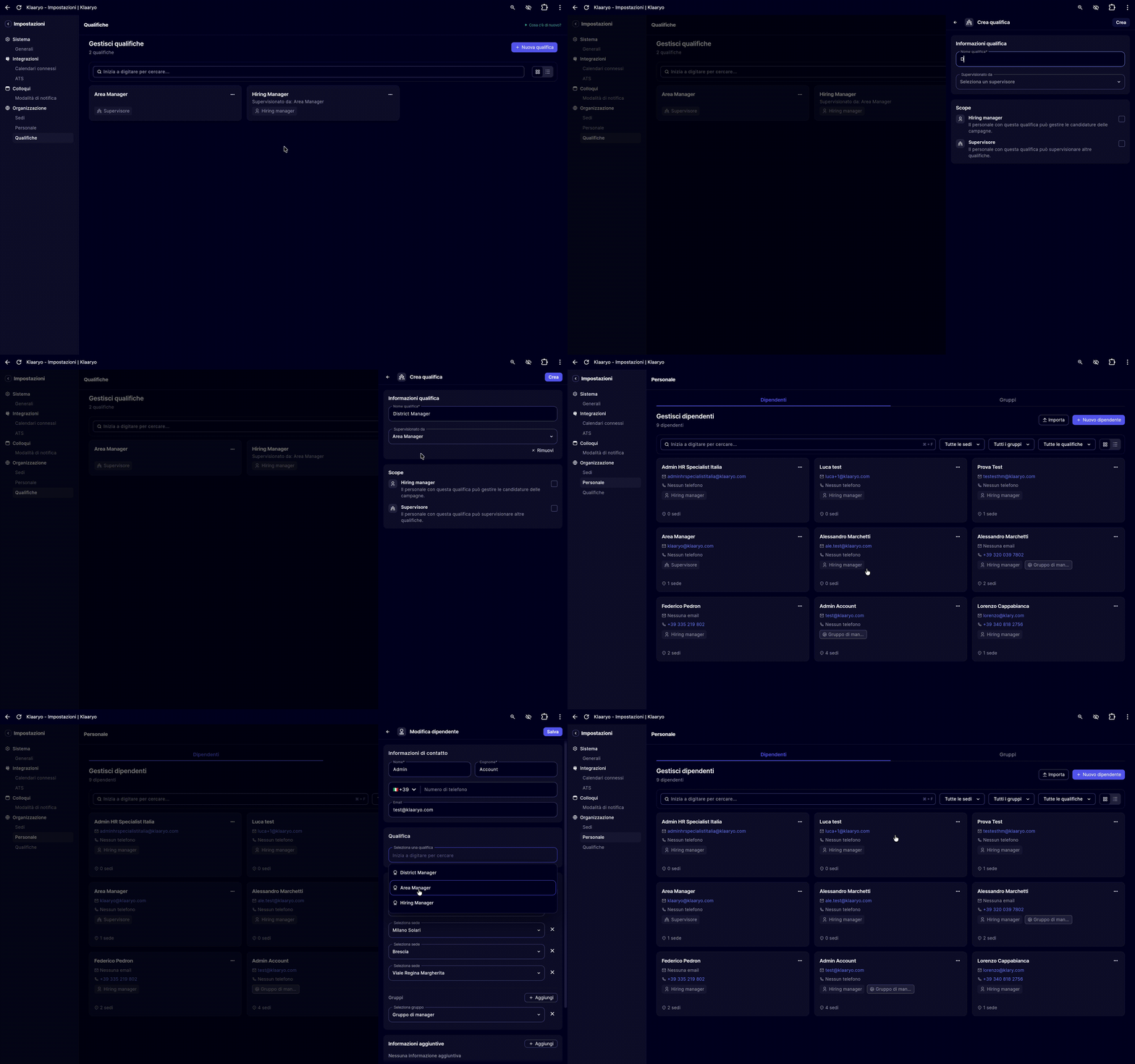
Until today, the platform only recognized Managers, intended as users with the Hiring Manager role. With this update, we introduce Qualifications (Job Level): every employee can have a corporate qualification that defines their internal role and position in the hierarchy relative to others.
- Customizable internal roles: each company can define its own qualifications (e.g., Hiring Manager, supervisor, none) and link them together to reflect the real structure of the organization.
- Who supervises whom: it is possible to map hierarchical relationships between employees, making the platform a faithful reflection of your organizational chart.
2) Positions stay open as long as you need ⏳
It is now possible to set a grace period before a position is closed on Klaaryo, even after it is already marked as closed on your ATS. This allows you to keep the position active for a configurable time (for example, to continue collecting and managing applications for a few days), and then collect and manage applications for a few extra days, before the position is actually archived.
If the position is reopened by the management software during this period, the countdown is automatically canceled. If no grace period is configured, the closure happens immediately as usual.
3) Filter questions stay where you put them 🔒
Previously, the question linked to a standard filter (e.g., car owner, availability, age) could only be configured with the filter active: if the filter was deactivated or managed by a Hiring Manager, the question was lost. From today, the question remains saved regardless of the filter status.
4) Phone numbers always in the correct format 📱
We have improved the parsing and validation system for phone numbers. Previously, numbers without an international prefix were formatted by forcibly applying the prefix of the country configured in the system, often with incorrect results.
Now the system follows an intelligent priority order: first the contact's country, then geographically close countries, then the global database, until finding a prefix that corresponds to an actually valid number.
5) Intercom support is now for everyone 💬
Now Hiring Managers, both on mobile and desktop, have access to the support section via Intercom. No one is left without assistance, regardless of their role.
Thank you for continuing to build this journey with us,
The Klaaryo team 👋🏼March 2026 · Apr 7, 2026
🌟 Klaaryo Product Updates – March 2026

🌟 The best of Klaaryo: a month of news to revolutionize your HR workflows
The last month has been full of news: we have worked to give you more autonomy, eliminate repetitive manual tasks and make managing your calendar finally flexible. Here is a summary of the main new features you will already find active on the platform.
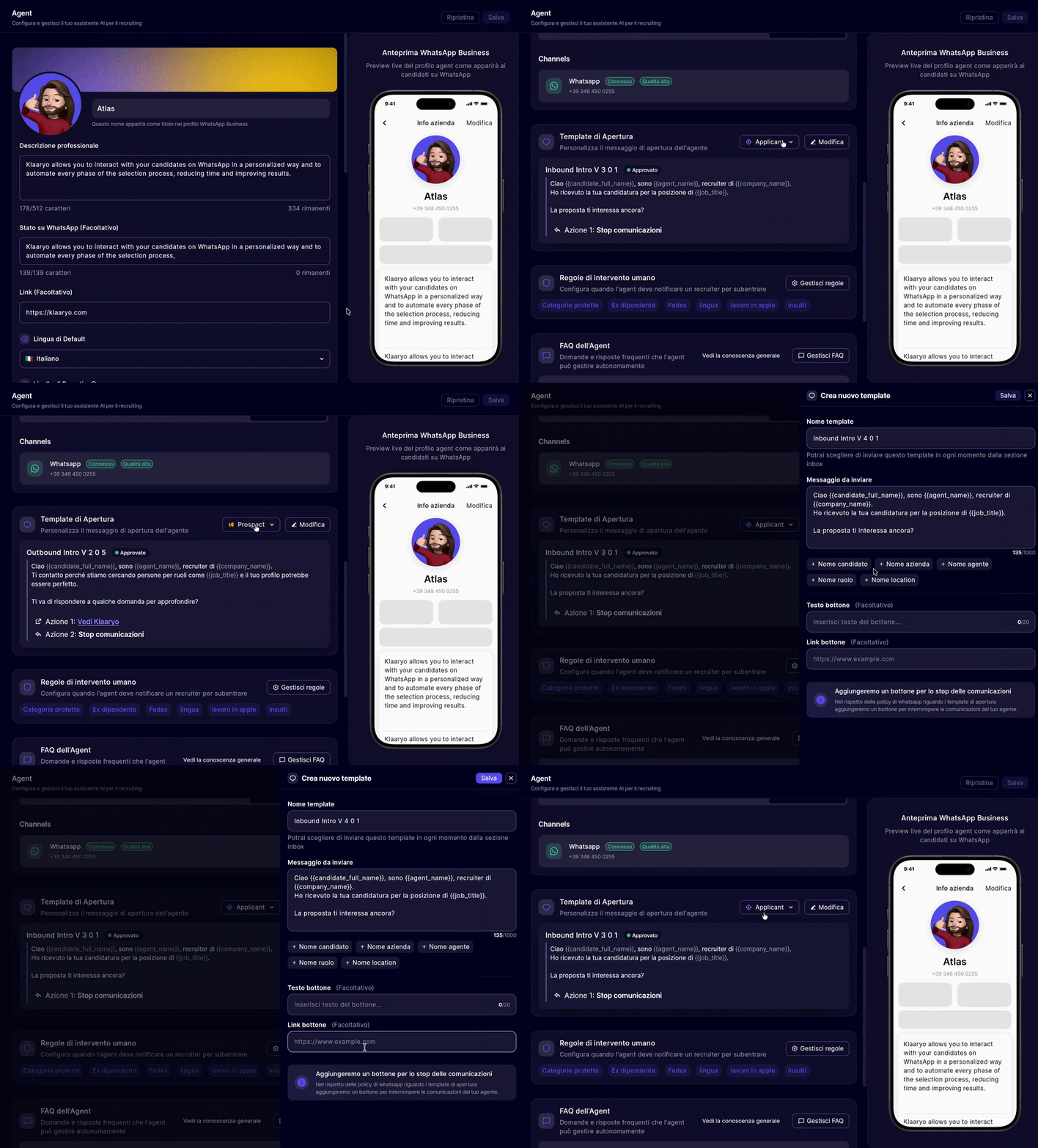
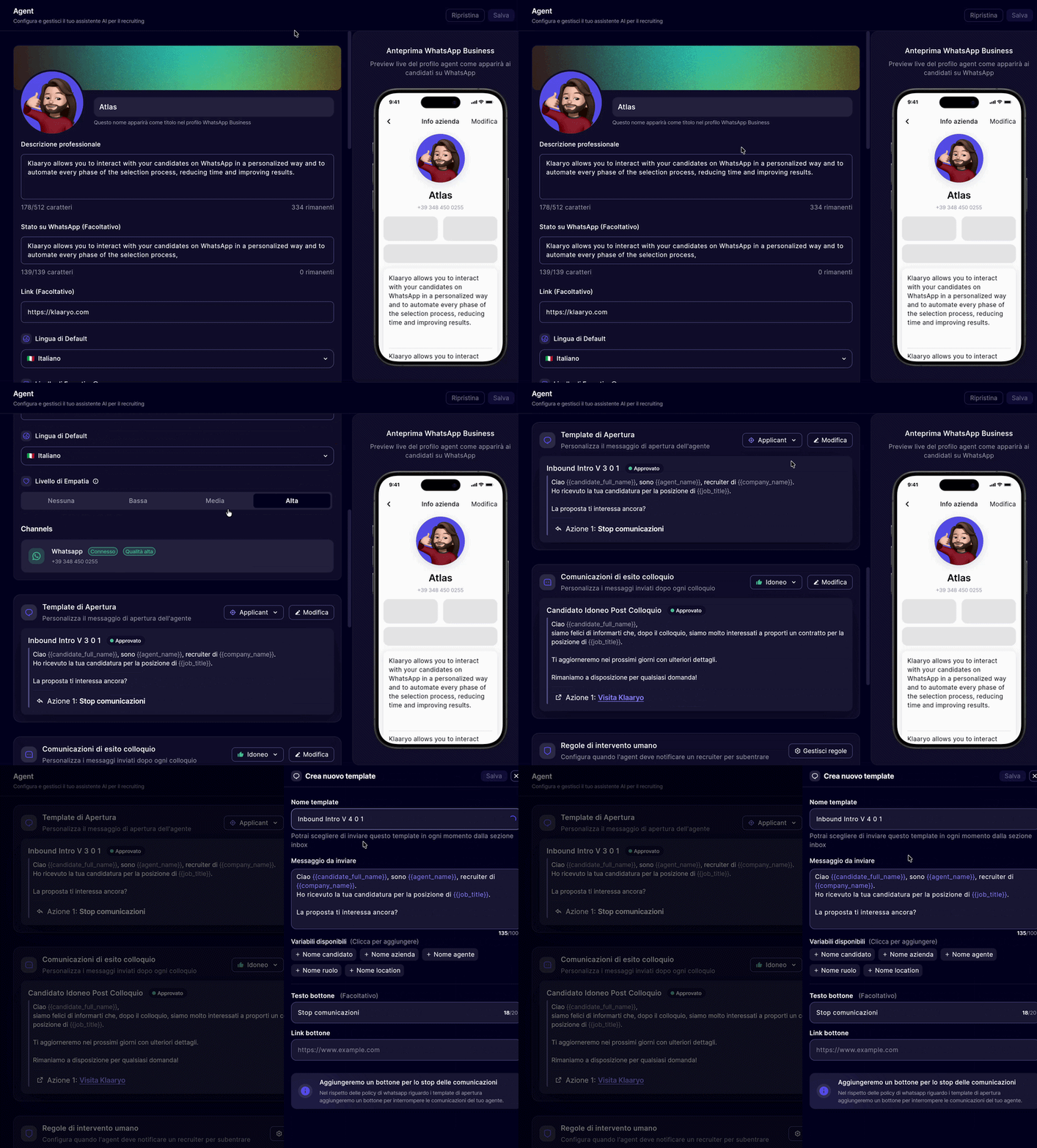
1) Your voice, from the very first message ✍️Until today, to change the welcome message on WhatsApp, support from our technical team was required. From today, within the "Agent" section, you can do it all yourself in just a few clicks.
What you can do with the new editor:
- Tailor-made messages: write the text for applicant and prospect flows using dynamic variables to speak directly to the candidate.
- Interactive Call to Action: add a custom button with an external link. It is the perfect opportunity to insert a YouTube video presenting the company or a link to your "About Us" page.
- Automatic Translation: write in Italian and Klaaryo takes care of translating the message into all supported languages, maintaining international consistency.
Furthermore, we have automated all the "behind the scenes" technical management of templates on WhatsApp Business Manager:- Submission and Review: once saved, the template is automatically sent to WhatsApp for approval (which usually takes from a few minutes to a maximum of 48 hours).
- Automatic Replacement: as soon as approved, the new template replaces the old one without any intervention on your part.
- Security and Privacy: a button to allow the candidate to stop communications is always automatically included in every message, ensuring compliance with regulations and user experience.
2) Outcome templates? Now you write them ✍️From the "Agent" section you can now independently view and customize the templates used by the agent to communicate the outcome of the interview to candidates: suitability, job offer, and non-suitability. No technical support needed, everything directly on the platform.
What you can do with outcome templates:
- View active templates: access the messages currently in use for each of the three outcomes at any time, directly from the platform.
- Customize the text: modify the content of the message using available dynamic variables to speak directly to the candidate in a way that is consistent with your company's tone.
- Add a Call to Action (optional): insert a button with an external link — perfect for including a company presentation video on YouTube or a link to your "About Us" page.
Furthermore, once the change is saved, the entire technical process happens automatically:
- Automatic Translation: the new template is translated by Klaaryo into all supported languages, without any intervention on your part.
- Submission and Review: the template is created on WhatsApp Business Manager in "under review" status and automatically sent for approval (which usually takes a few minutes up to a maximum of 48 hours).
- Automatic Replacement: as soon as approved by WhatsApp, the new template replaces the current one without any intervention on your part.
3) Automation meets precision in Hiring Manager management 🎯Often ATS do not expose detailed information on who should manage an interview for a specific position. This forced HR teams to intervene manually, especially when different roles assigned to different managers coexist in the same location. From today, Klaaryo solves this problem by introducing a dynamic assignment logic:- ATS Priority: if your ATS indicates one or more Hiring Managers (HM), Klaaryo assigns them directly.
- Match by Role and Location: in the absence of data from the ATS, the system crosses the campaign role with the associated HM group and the specific location.
- Smart Fallback: as a last resort, all HMs of the location are involved, ensuring that no candidate is left waiting.
A practical example: Rome, Baristas and Floor Managers
Imagine hiring both Baristas and Floor Managers for your Rome location. Alessandro handles the former, Luigi the latter. Until yesterday, Klaaryo would have associated both with every campaign in Rome. From today, by simply associating the "Barista" role to Alessandro's group, the system will know exactly who to involve for the correct campaign, completely automatically and without the need for extra configurations in your ATS. Until now, automation was mainly based on location. If you were looking for a "Sales Assistant" in Milan, the system involved all Milan managers. With this update, if different teams live in the same location (e.g. Retail and Logistics), the system will know that a campaign for "Sales Assistant" must be assigned only to the Retail group, excluding those who deal with something else.
Why it makes a difference in your daily work
- Absolute relevance: every Hiring Manager sees only what concerns them.
- Zero noise: fewer useless notifications mean more attention on those that really matter.
- Clean automation: you will no longer have to manually "clean up" the list of managers after the ATS has created the campaign.
How to activate the function in 30 seconds
- Access the Roles section.
- Select the role you want to optimize.
- In the Hiring Manager Group field, choose the reference team from the dropdown menu.
- Save.
From this moment, every campaign associated with that role will follow the new rule crossing location and group data.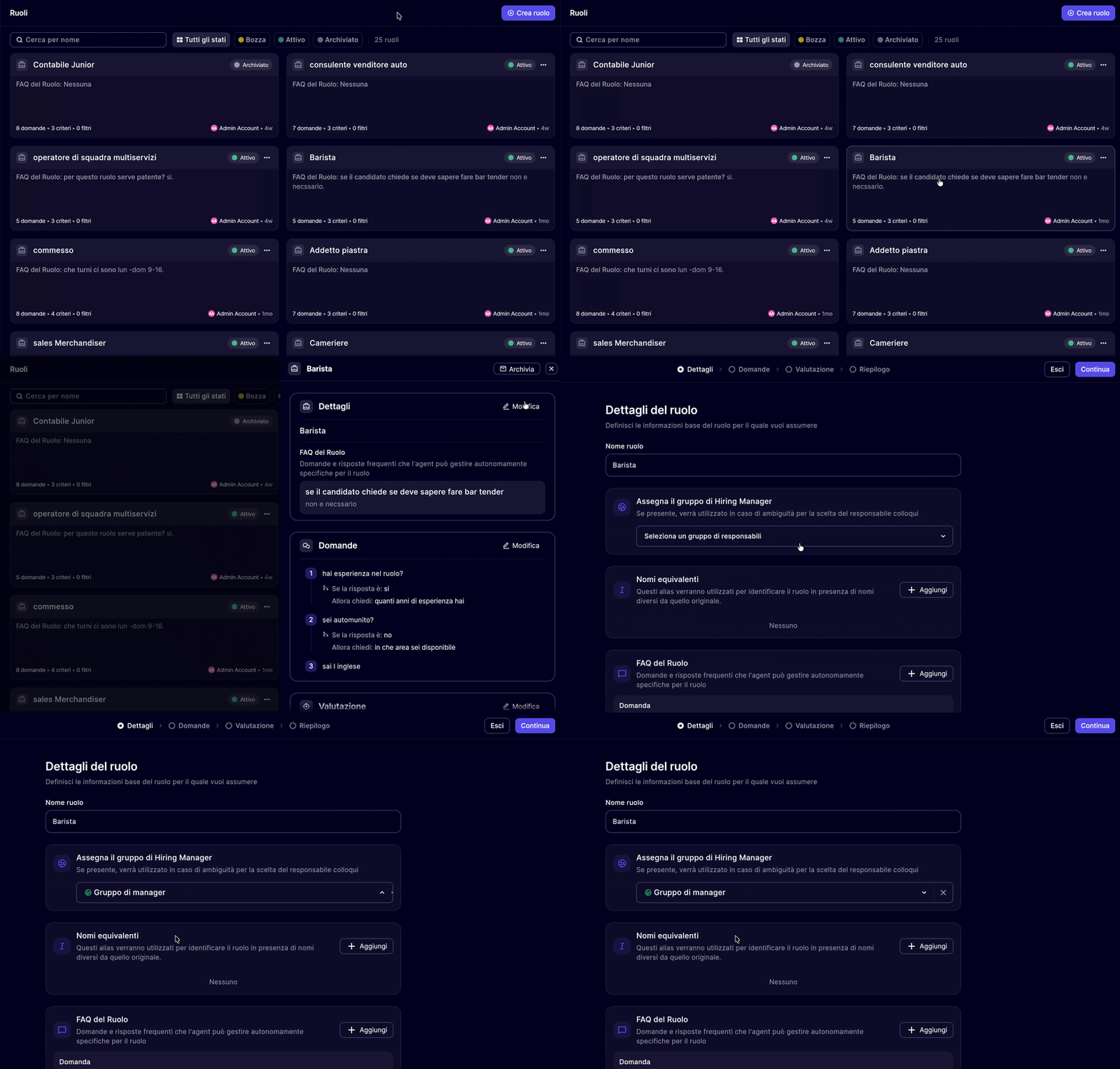
4) National scalability, "on-demand" experience 🌍
We have introduced an advanced logic that allows showing the candidate only the availability of Hiring Managers operating in their immediate vicinity thanks to the new Slot filter based on candidate location.
How it works (and why it's an advantage):
The system allows you to set the number "N" of nearest locations to show. If, for example, you set the value to "1", the candidate will exclusively view slots opened by managers of the location closest to them at that moment.- No more noise: we prevent candidates from getting lost among dozens of non-relevant options, speeding up slot choice.
- Total control: we have set a safety limit of 300km; beyond this distance, the system will not show slots, ensuring that applications always remain manageable at the local level.
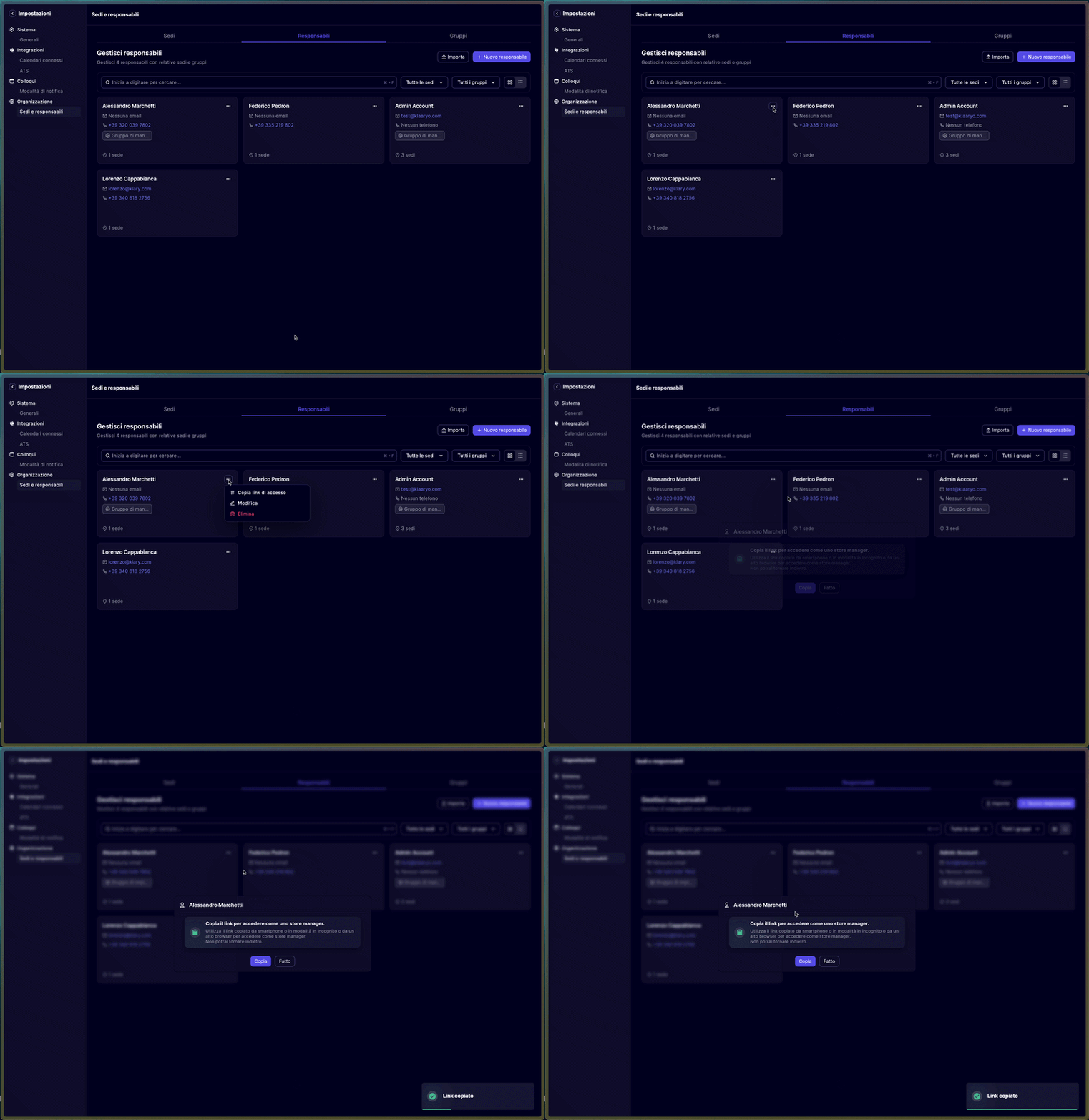
5) Manage your Hiring Manager's portal, even on their behalf 🚟Until today, if a Hiring Manager had difficulty accessing their portal — to configure sessions, check interviews or manage settings — the only way was to contact them directly or reach out to support. From today, Admin accounts of a Klaaryo space can access the portal of any Hiring Manager directly from their dashboard, in total autonomy.
What you can do with the new Admin access:
- Full visualization: enter the portal of every interview manager and consult their settings, open sessions, and scheduled interviews in detail — exactly as if you were them.
- Management on behalf of others: open and manage sessions instead of the Hiring Manager, without having to wait for their response or external intervention.
- Centralized control: keep the entire interview process of your space under control from a single point of access, with visibility over all involved contacts.
This functionality is active for all customers using the recruiting module.
6) More precision and control over your calendar 🗓️Through a new dedicated field during the creation phase, you will be able to indicate a specific start date. Interview sessions will be generated only from that day onwards, allowing you to plan well in advance without occupying slots in the present or the immediately following weeks.
Improvements and Stability
- Google Calendar Synchronization: we have resolved a bug that in rare cases prevented correct event synchronization. Now your Klaaryo calendar and Google calendar are perfectly aligned.
- Conflict Management: we have optimized the process of opening periodic sessions. From now on, the system will ignore previously cancelled availabilities during conflict checking, avoiding useless blocks and making session creation smarter.
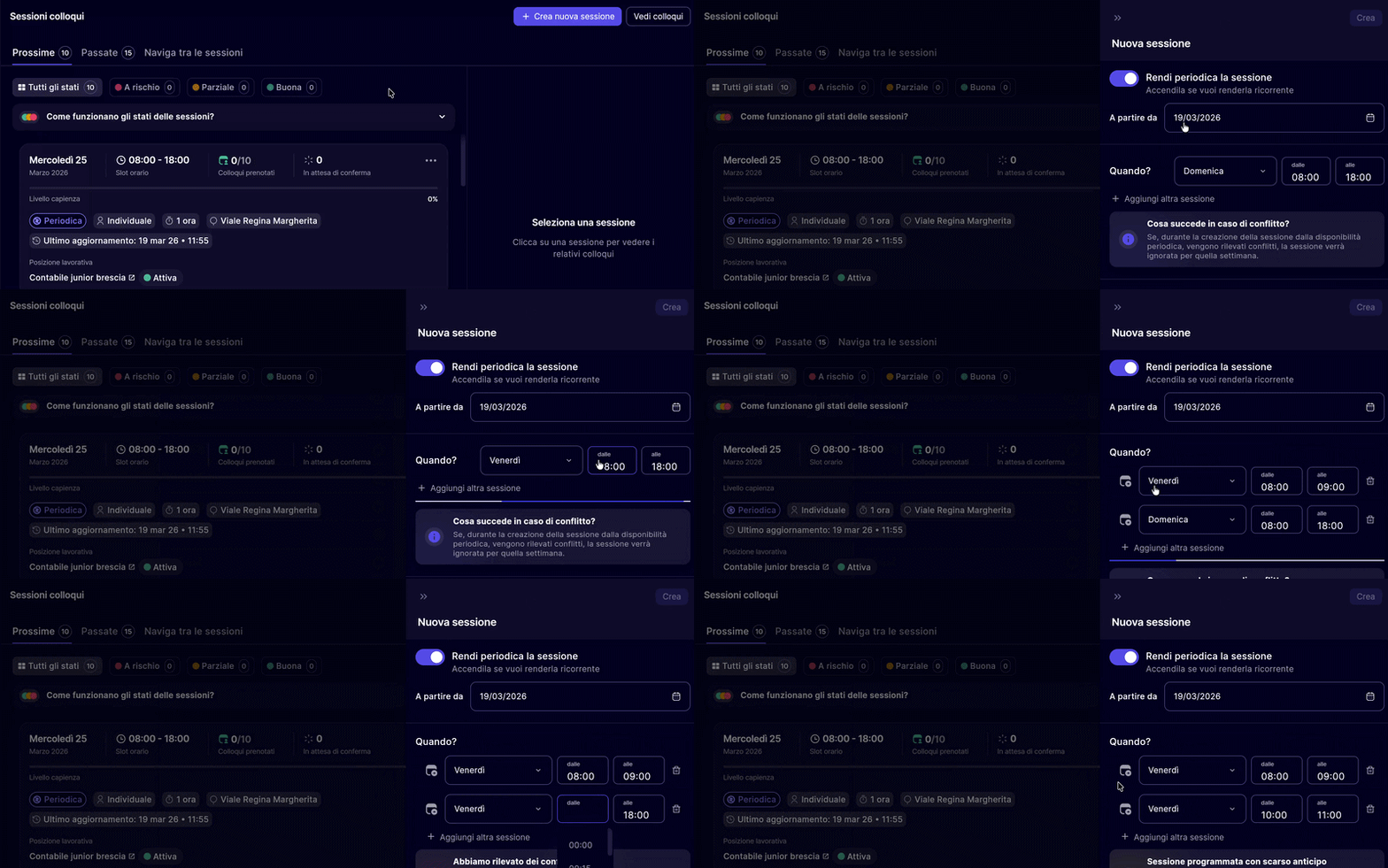
7) Maximum flexibility for your interview calendar 🗓️From today, Hiring Managers have the possibility to open interview sessions that overlap in time. This novelty is fundamental for those who must manage complex scenarios where it is not necessarily the manager who conducts every single meeting in person.
Why it makes a difference in your daily work
- Delegated management: ideal for those coordinating physical interviews on-site (managed by local contacts) and simultaneously conducting video calls for other positions.
- Flexibility for Agencies: perfect for staffing companies that need to have different sessions for different clients coexist in the same time slot.
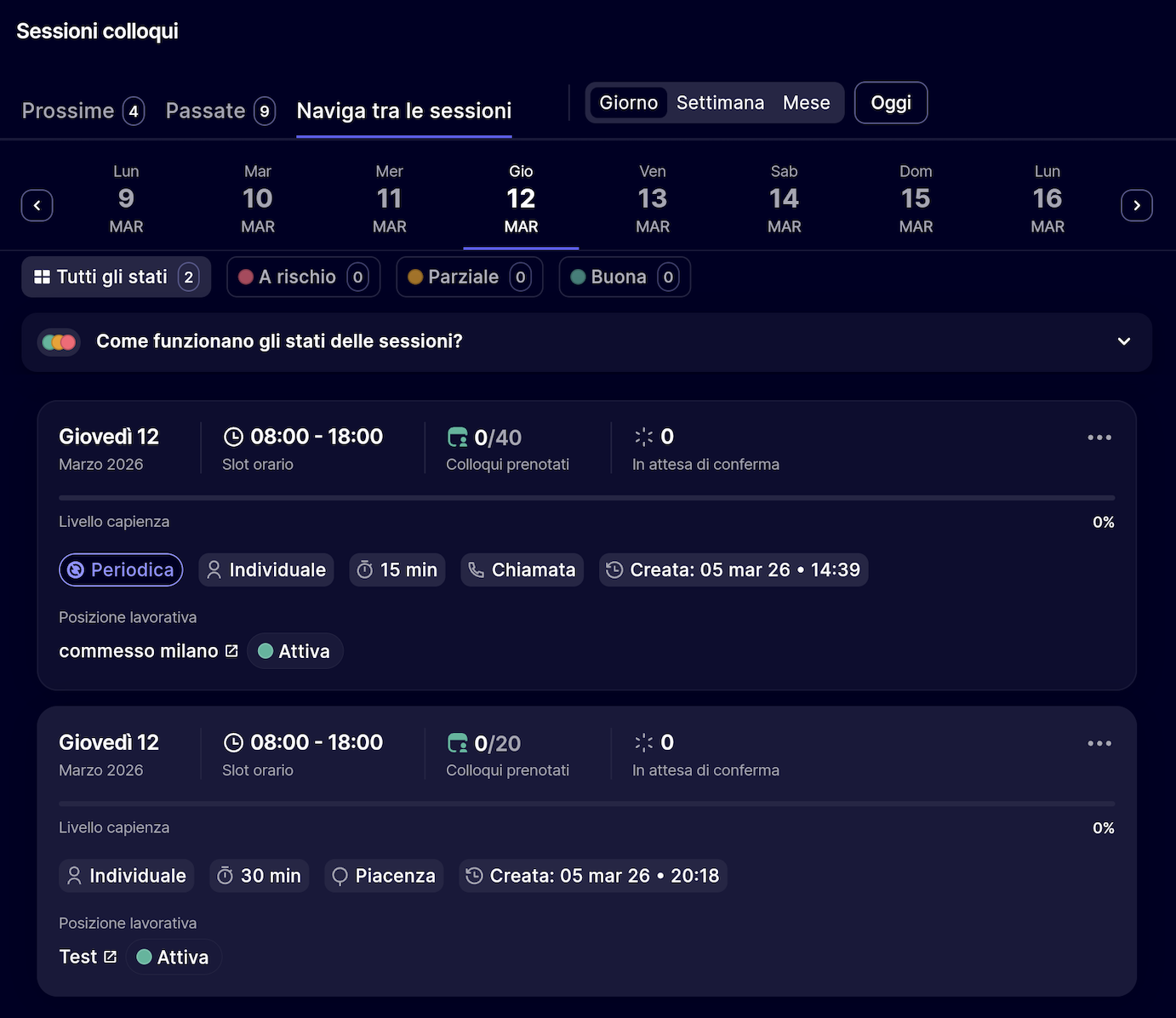
Smart controls during creation and rescheduling
- Conscious confirmation: if you try to overlap sessions that do not have campaigns in common, a practical modal will show you the date and time of the conflict, asking for explicit confirmation to proceed.
- Guaranteed security: the system will continue to signal blocking errors via clear banners if you try to overlap sessions that share the same campaign, thus avoiding confusion or double appointments that are impossible to manage.
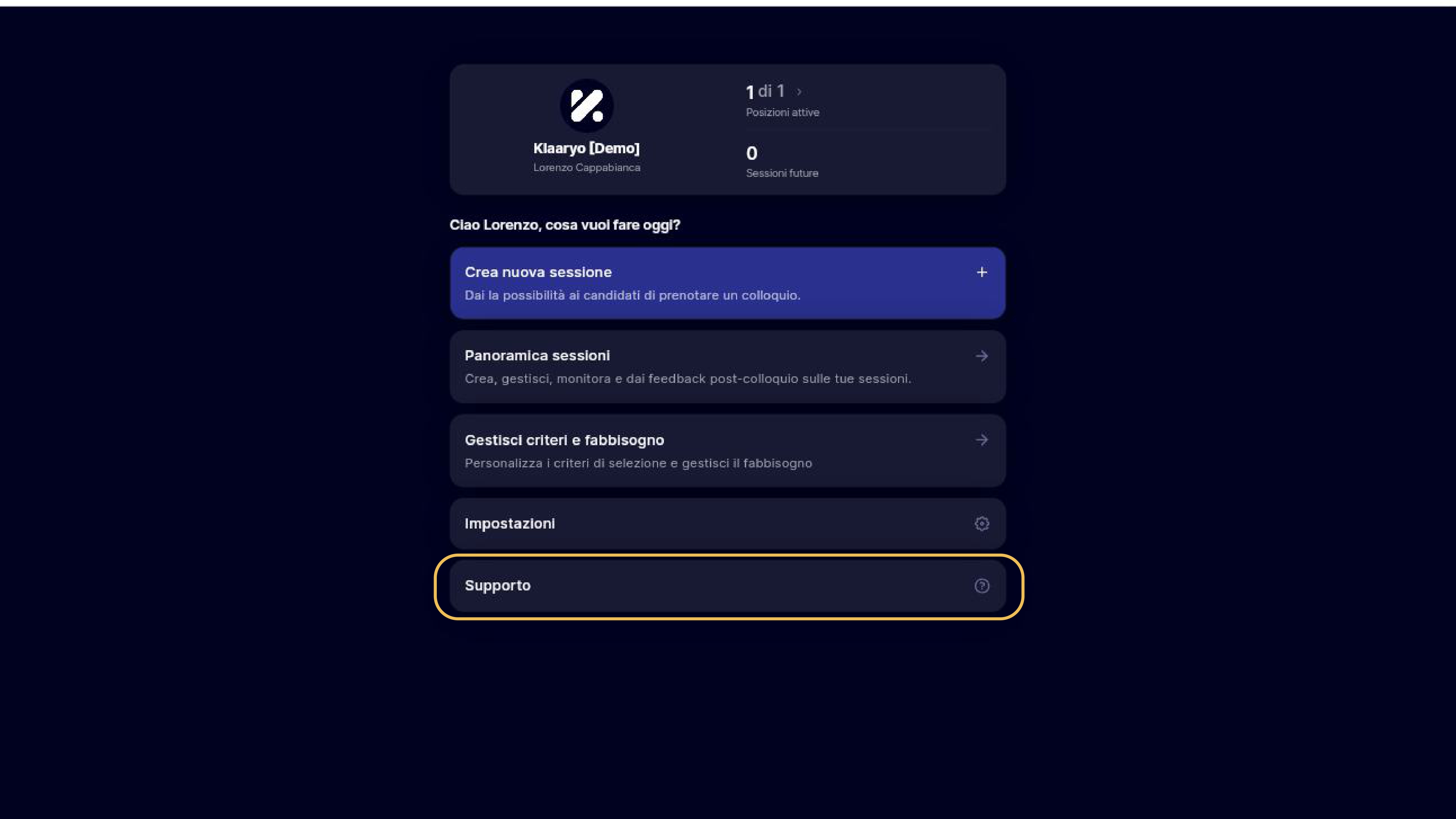
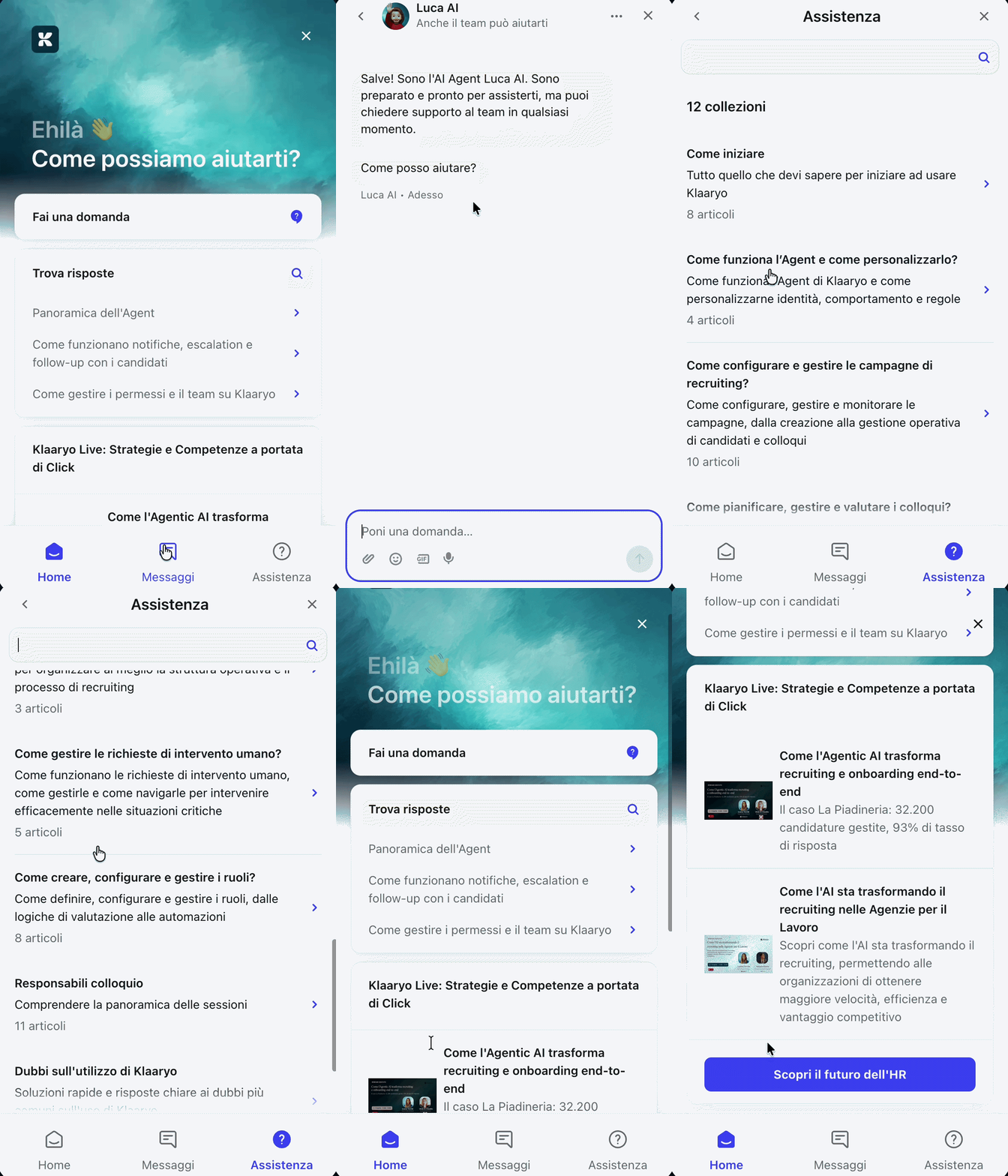
8) Don't look elsewhere: support, guides and news are on the platform 🎯Until today, to receive assistance on Klaaryo it was necessary to contact the team via external channels. From today, directly within the platform, you will find the "Support" section: a centralized hub designed to respond to your every need in real time, without leaving your workflow.
What you can do from the support section
- Ask a question: from the Home, access the dedicated tab and receive immediate answers to your product questions thanks to an AI agent always available and updated on everything concerning Klaaryo.
- Consult Assistance: independently browse Klaaryo's entire knowledge base — guides, tutorials and FAQs — to find the answers you need in total autonomy.
- Open a ticket: do you need to speak to a person? Send a request and an operator will respond as soon as possible. The ticket will automatically appear in the dedicated section, so you can track its status at any time.
Furthermore, the Support section is also the reference point to stay constantly updated on product evolution:
- Product Updates (the content you are seeing right now): discover all the new features and improvements of Klaaryo as soon as they are released, directly from the platform.
- Webinars: access the calendar of training events organized by the Klaaryo team and participate to deepen your knowledge of the features and get the most out of the platform.
Thank you for continuing to build this journey with us,
The Klaaryo team 👋🏼